





It’s important to know when and where to apply a certain type of technology. Just because something is cool and viral doesn’t mean it’s universally useful.
Inspired by Andrei Karpathy and Tobi Lutke’s posts about autoresearch, I wanted to give the loop mechanism a try with a different target. The loop itself only proposes a change, checks against a goal number and keeps or reverts based on the output. For example, Tobi’s benchmark script printed out the parse_time for the files as a feedback signal.
In order to understand it better, I build another version and pointed it at a sample cold outreach email after watching Greg Isenberg’s video on autoresearch.
My first attempt was just a simple markdown file to optimize which is covered here.
In this test, the goal was to see if 10-20 iterations would outscore a one-shot prompt from Claude while using a nested loop to optimize several goals and their individual weights.
All of the code is here on github. Let’s get into some of the details.
The Loops
There are two layers nested in the loop. The inner loop proposes the change, scores it and decides whether to keep it or revert the change. Instead of a single benchmark script, this runs different evaluators whose scores are weighted into a single combined output.
There is a 2nd “meta-loop” that runs every 5 iterations and rewrites the scoring criteria itself, adjusting the weights of the scoring criteria that the loop was struggling with. If the win rate drops, this part of the loop tries to diagnose why and update the scoring rubric.
The demo has five different evaluators. Four of them are locally run deterministic variables: a spam trigger word counter, a CAN-SPAM checker, an alt-text checker and a CTA focus scorer that looks for competing calls to action. Finally, there’s the LLM “judge” that scores the email against the written rubric in the goals file.
The test artifact is a purposefully terrible cold outreach email that is full of problems.
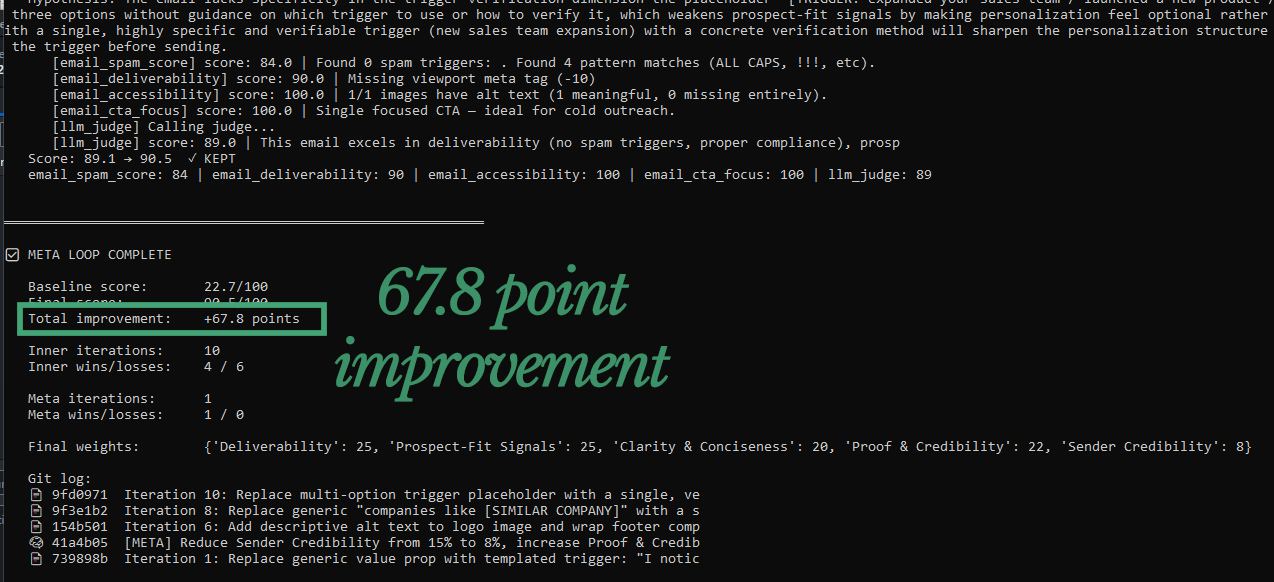
The untouched sample email only scores a 22.7/100 in the baseline scoring within the loop.
During the first run of 20 iterations, the score improved 66.8 points to 89.5.
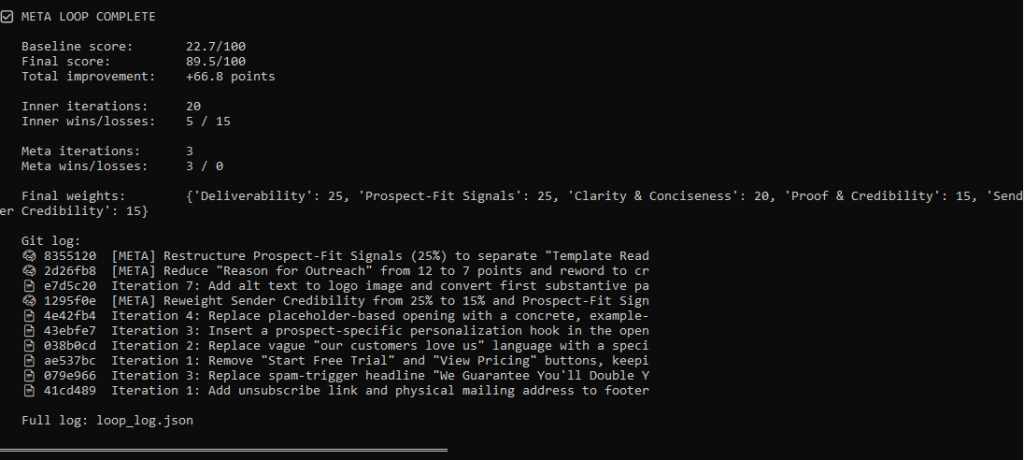
It fixed the spam violations, the CTAs, wrote alt text and much more…
This seems pretty cool and I wonder what would happen if it was applied to other targets and left to run 100+ times.
Then again…let’s compare to regular old prompting.
Comparison 1: One-shot in Claude
To have a comparison for the experiment, let’s try optimizing the sample artifact with Claude.
For this test, I uploaded the goals.md file and the original artifact along with the prompt. We’ll see how it performs vs. using the iterative loop.
Claude is pretty smart and output the scores before and after – but… how does this compare to the judge in our loop?
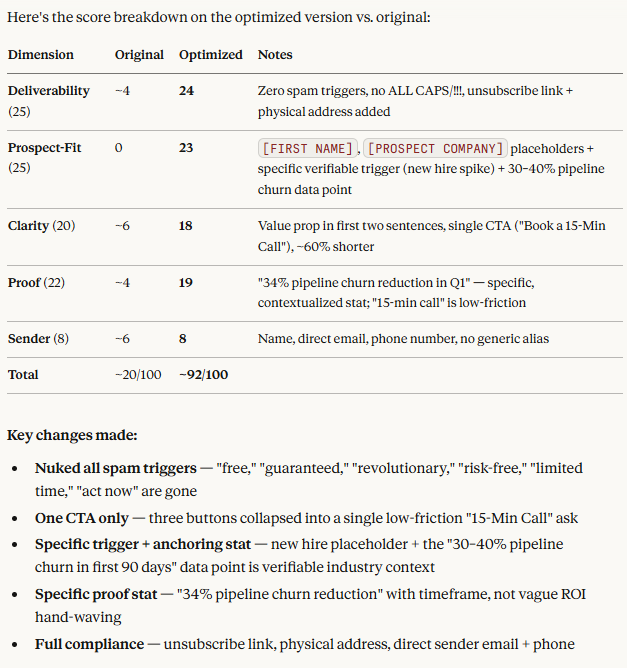
Let’s see how the judge scores it:
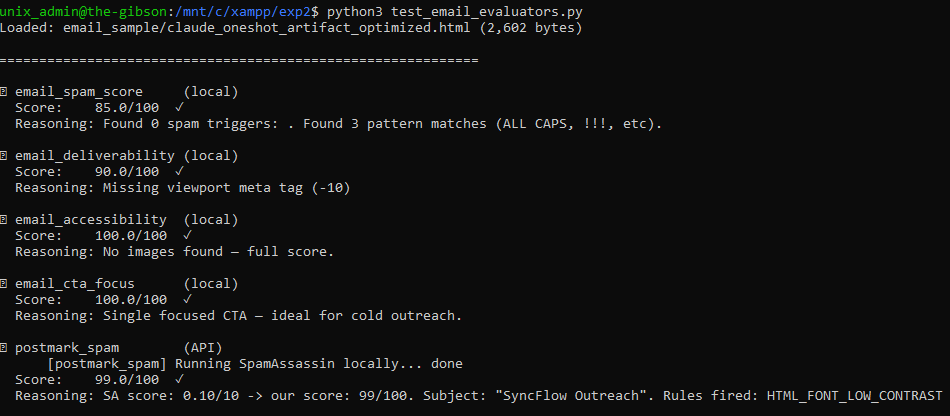
Well, there it is – 99/100 with the one-shot prompt. No need to run the iterative loop 100 times.
That said, we do have a pretty solid goals.md file as an optimization reference. Let’s see what happens with a bad prompt.
Comparison 2:
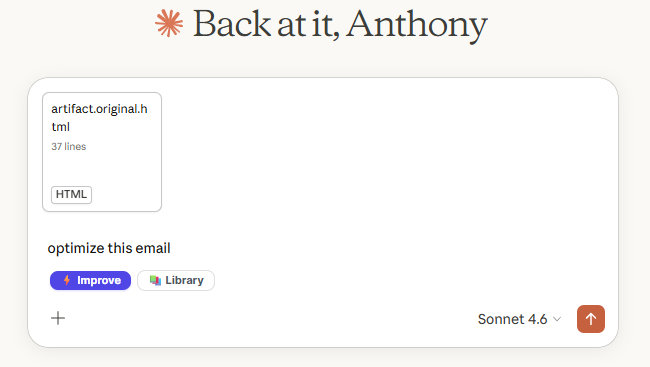
Now, that’s a lazy prompt! Let’s see how this one scores in comparison.
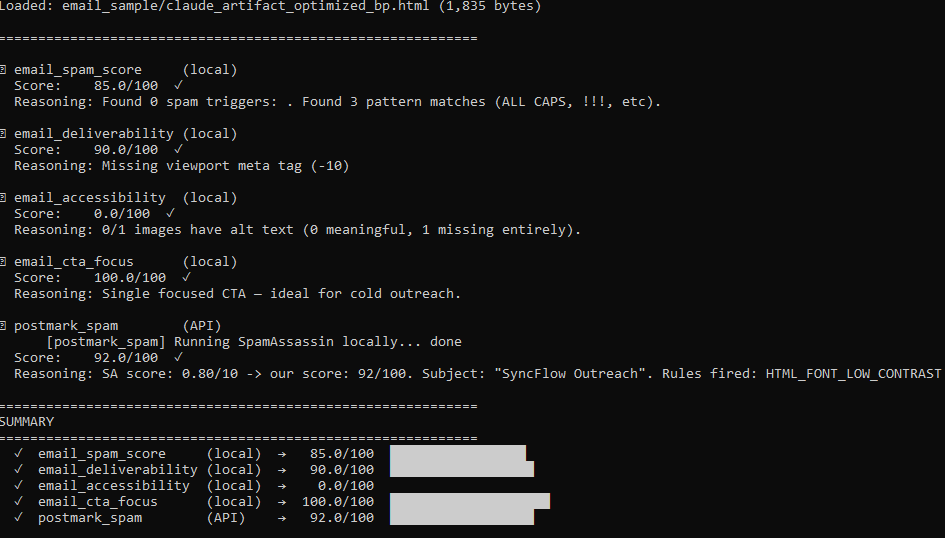
Even with a lazy prompt, we got an 85/100 total score which is a bit lower than the 20 iteration loop score of 89.5 but this was obviously much easier and faster than letting the loop run.
I think the best thing to take away from this experiment is to make sure your prompts are always top-notch. If you’re trying to optimize something, giving numerical goals with weights might actually help get a better outcome.
Where the loop actually works
I think this pattern can be very useful when applied in the right way. It’s a bit challenging to define trustful evaluators for content in comparison to a feedback signal like parse_time or compilation_time, word_count, etc… those metrics can’t be gamed or hallucinate. The loop can grind and grind against an optimization metric for hundreds of iterations with hundreds of tests and hypotheses.
It also doesn’t necessarily have to run iterations instantly… the improvement loop could live in the background and optimize certain metrics slowly like the effect of certain changes on conversion rate or close rates that don’t have instant feedback.
Optimizing the text and html of a single file is much different than a large codebase like what Tobi was working on with the Liquid RB files. There’s an enormous number of changes that could be made which have major, measurable consequences. On the other hand, a short email may have a dozen issues that can be fixed with one prompt. I think it’d be interesting to see how it does with a longer document
The Code
The full implementation — inner loop, meta-loop, evaluator registry, email demo, and a reset script for running clean experiments — is all on GitHub at [link].
If you want to try it against something that has a real ground truth signal, the evaluator interface is straightforward: any function that takes a document and returns a float between 0 and 100 can be registered and weighted. The loop doesn’t care what’s inside it.
Just don’t point it at anything where the best evaluator you can write is another LLM.
Save yourself the API costs and write a good prompt instead.
In any case, it’s fascinating to watch it run and improve iteratively, accepting changes that move the score higher and rejecting changes that don’t have a meaninful change.
——-
What’s in the Repo (summary)
The project is organized into a core loop, a pluggable evaluator system, and a working email demo you can run immediately. Here’s what each piece does.
autoloop_meta_eval.py — the main script you actually run. It contains both the inner loop (propose, score, keep/revert) and the outer meta-loop that rewrites the scoring criteria when the inner loop stalls. Everything flows through here.
email_sample/artifact.html — the document being optimized. In the demo this is a deliberately broken cold outreach email. You can swap it for any HTML, markdown, or plain text file you want the loop to improve.
email_sample/goals.md — the scoring rubric, written in plain English. The LLM judge reads this to decide what “better” means. The meta-loop rewrites this file when it thinks the criteria need adjusting — which is why it’s a file and not hardcoded.
email_sample/eval_config_email.yaml — the evaluator weights. This is where you tell the loop how much each scorer counts toward the composite. Changing the numbers here changes what the loop prioritizes without touching any code.
email_sample/evaluator_email.py — the email-specific scorers. Four fully deterministic functions (spam trigger counter, CAN-SPAM structural checker, alt text coverage, CTA focus) that run locally with no API calls. This is the most useful file to study if you want to write evaluators for your own domain — each function is about 20 lines and the pattern is identical.
test_email_evaluators.py — runs all evaluators against the current artifact and prints a score breakdown. Run this before starting a loop so you know your scorers are working and your baseline is what you expect.
reset.sh — restores the artifact to its original broken state, wipes the loop log, and nukes the git history back to a single baseline commit. Essential for running clean experiments without leftover state from a previous run.
eval_configs/ — example YAML configs for other domains: Ruby performance, landing page copy, pitch decks, code quality. None are wired to real evaluators yet, but they show how you’d structure weights for a new use case.
autoloop.py and autoloop_meta.py — earlier, simpler versions without the evaluator registry. Worth reading if you want to understand the core pattern before the full implementation adds layers on top of it.
The fastest path to understanding how it fits together: open autoloop_meta_eval.py, find run_evaluators(), and follow what happens when it calls each registered function. Everything else is scaffolding around that loop.